Why does your waiver matter?
Your waiver is a mandatory safety requirement and needs to be valid and up to date every time you surf. It expires every 6 months, so it’s worth checking it regularly to ensure you are all set for your next surf.
Below is a video walk-through on how to check your waiver status and sign your waiver from your booking portal:
Steps to check your waiver status and signing your waiver
Step 1: Log in to Your Account
Start by logging in to your online Booking Portal account or Creating an account using the same first name, last name or email address linked to your booking account.
Step 2: Find your waiver status
Head to the menu in your account on the left-hand side of the screen on your desktop or right-hand side when using your mobile device — your current waiver status will be shown there: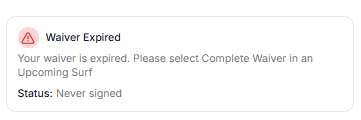
Step 3: Update your waiver
If it’s expired, go to the My Surfs tab and tap the three dots next to an upcoming session and Select “Complete Waiver” to launch the waiver app.
Step 4: Complete the waiver and confirm your details
Follow the prompts to fill in your personal information and sign your waiver.
Step 5: You're covered
Once submitted and signed, your status updates to Active on your dashboard. You are all cleared and ready for your upcoming surf.
Please note: you require a valid upcoming surf to be able to sign your waiver.